
Test ordering and result viewing at the patient's bedside
TDWeb, the TECHNIDATA web solution for test ordering and result viewing, gives access to the latest test results at the patient's bedside.

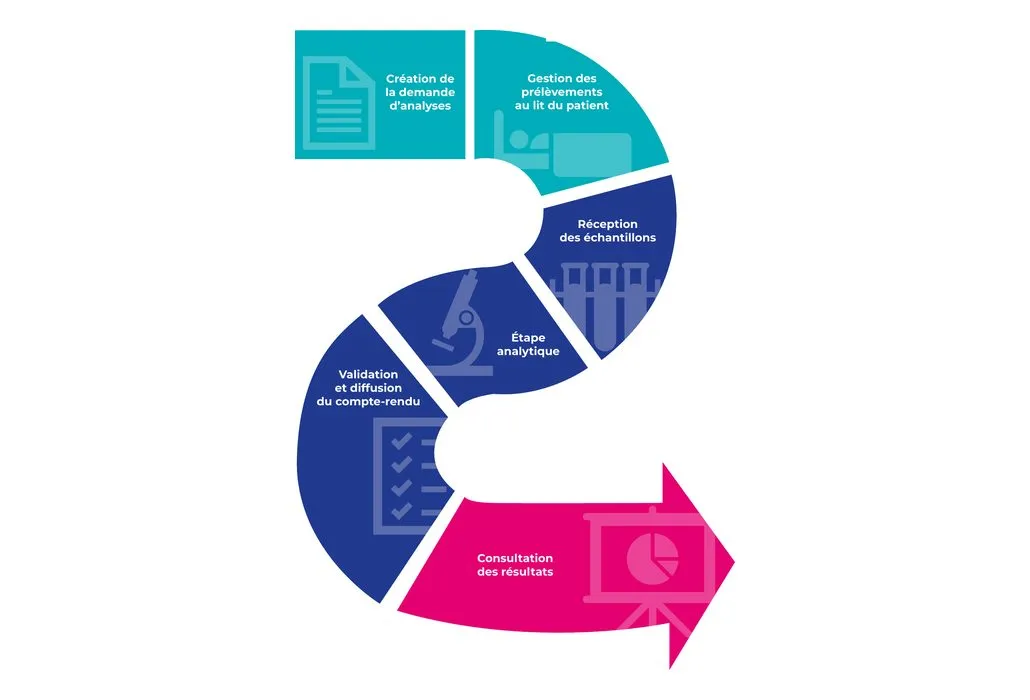
Order creation
Prescribers create their requests from customizable test panels, with redundancy checks and order priorities.

Sample collection at the bedside
Identification and acknowledgment of samples, collection plans and sample tracking at every step.

Result viewing
Real-time results, indicators for new results and abnormal values, detailed, cumulative or graphical views.

HIS integration and multi-site
Contextual calls from the hospital information system (HIS), multi-database configurations and multi-site management.

Key features
Request creation
From care units, prescribers create their test requests from the laboratory's dictionaries:
- Customizable test panels
- Panels based on the laboratory's dictionaries
- Adapted to the laboratory's needs
- Redundancy check
- A redundancy check accompanies request creation
- Additional parameters and priorities
- Entry of additional parameters
- Order priorities
- Collection protocols
- Access to collection protocols from the order
Accordion title
Heading 1
Heading 2
Heading 3
Heading 4
Heading 5
Heading 6
Text paragraph.
Quote
Ordered list
- Item 1
- Item 2
- Item 3
Unordered list
- Item A
- Item B
- Item C
Bold text
Emphasis
Superscript
Subscript


Sample collection management
At the patient's bedside, TDWeb supports every step of sample collection:
- Identification and acknowledgment
- Sample identification
- Acknowledgment of samples at the patient's bedside
- Collection date and time
- Automatic integration of the collection date and time entered beforehand
- Collection plans
- By patient, by collection round or by sample type
- Organization of sample collection
- Sample tracking
- Tracking of the sample at every step, until it is received at the laboratory
Accordion title
Heading 1
Heading 2
Heading 3
Heading 4
Heading 5
Heading 6
Text paragraph.
Quote
Ordered list
- Item 1
- Item 2
- Item 3
Unordered list
- Item A
- Item B
- Item C
Bold text
Emphasis
Superscript
Subscript
Result viewing
Once the report has been validated and released by the laboratory, care teams view the results in TDWeb:
- Real-time results
- “New results” indicator
- Indicator for abnormal values
- Several result views
- Detailed, cumulative or graphical view
- Access to patient history
- Multi-discipline results
- Result viewing, whatever the discipline
- Rights and audit
- User rights management
- Audit of result viewing
Accordion title
Heading 1
Heading 2
Heading 3
Heading 4
Heading 5
Heading 6
Text paragraph.
Quote
Ordered list
- Item 1
- Item 2
- Item 3
Unordered list
- Item A
- Item B
- Item C
Bold text
Emphasis
Superscript
Subscript

Integration and deployment
TDWeb integrates with the facility's environment and runs in a web browser:
- HIS integration
- Contextual calls from a hospital information system (HIS)
- Multi-database and multi-site
- Management of multi-database configurations
- Consolidation of results from multiple laboratories, laboratory information systems (LIS) and disciplines, including from different vendors
- Browser access
- System running in a web browser
- Support
- Audit of the laboratory's organization, installation follow-up, training and support
- ISO 15189 Quality support team, supporting the laboratory's accreditation process
Accordion title
Heading 1
Heading 2
Heading 3
Heading 4
Heading 5
Heading 6
Text paragraph.
Quote
Ordered list
- Item 1
- Item 2
- Item 3
Unordered list
- Item A
- Item B
- Item C
Bold text
Emphasis
Superscript
Subscript
Accelerate the digital transformation of your laboratory
They trust us
Challenges, solutions, results: discover how our clients use TECHNIDATA solutions every day.
Frequently asked questions
What support does TECHNIDATA offer for TDWeb?
A team of experts supports the laboratory: audit of the laboratory's organization, installation follow-up, training and support.
An ISO 15189 Quality support unit assists the laboratory with its accreditation process. The ISO 15189 standard defines the quality and competence requirements for medical laboratories.
Can TDWeb be launched from the hospital information system?
Yes. TDWeb supports contextual calls from a hospital information system (HIS).
A contextual call opens one application from another while keeping the working context, for example the current patient.
Is TDWeb suited to multi-site operations?
Yes. TDWeb handles multi-database configurations and consolidates results from multiple laboratories, laboratory information systems (LIS) and disciplines, including from different vendors.
What is a redundancy check for?
In TDWeb, a redundancy check is performed when the test order is created.
In general, a redundancy check aims to detect a test that has already been ordered before it is prescribed again.
Can physicians order tests and view results online?
Yes, with TDWeb. From a web browser, physicians create their test orders from panels based on the laboratory's dictionaries, then view results in real time, along with the patient's history.
Indicators flag new results and abnormal values; results are displayed in detailed, cumulative or graphical view.